 PY
PY按需加载
组件库按需加载
目前按需加载有两种方式实现。
- 使用
babel-plugin-import插件来自动按需引入 - 提供
es module版本,开启tree shaking
babel-plugin-import
babel-plugin-import是ant-design团队出的一个babel插件,主要用于模块的按需加载。其原理就是将直接引入的方式通过babel转化成按需引入的方式。如果css也需要按需加载,也会注入css引用代码。
例如
import { Button } from 'antd';转换成
import Button from 'antd/es/button';
import 'antd/es/button/style';tree shaking
如果组件库提供了es module版本,并开启了tree shaking,那么不需要babel-plugin-import,也可以达到按需加载的目的,这个方法只针对于js,对于样式的按需加载仍需要手动引入。 当然babel-plugin-import和tree shaking 也可以并存使用。但大部分情况并存使用与单独使用体积差距不是很大。 例如:
import { Button } from 'antd';
import 'antd/es/button/style';webpack可以通过在package.json设置sideEffects: false,开启tree shaking。
babel-plugin-import原理
babel-plugin-import 提供组件的按需加载
将
import { Button } from 'antd';转换成
import Button from 'antd/es/button';
import 'antd/es/button/style';第一步 依赖收集
babel-plubin-import 会在 ImportDeclaration 里将所有的 specifier 收集起来。大致的AST如下:
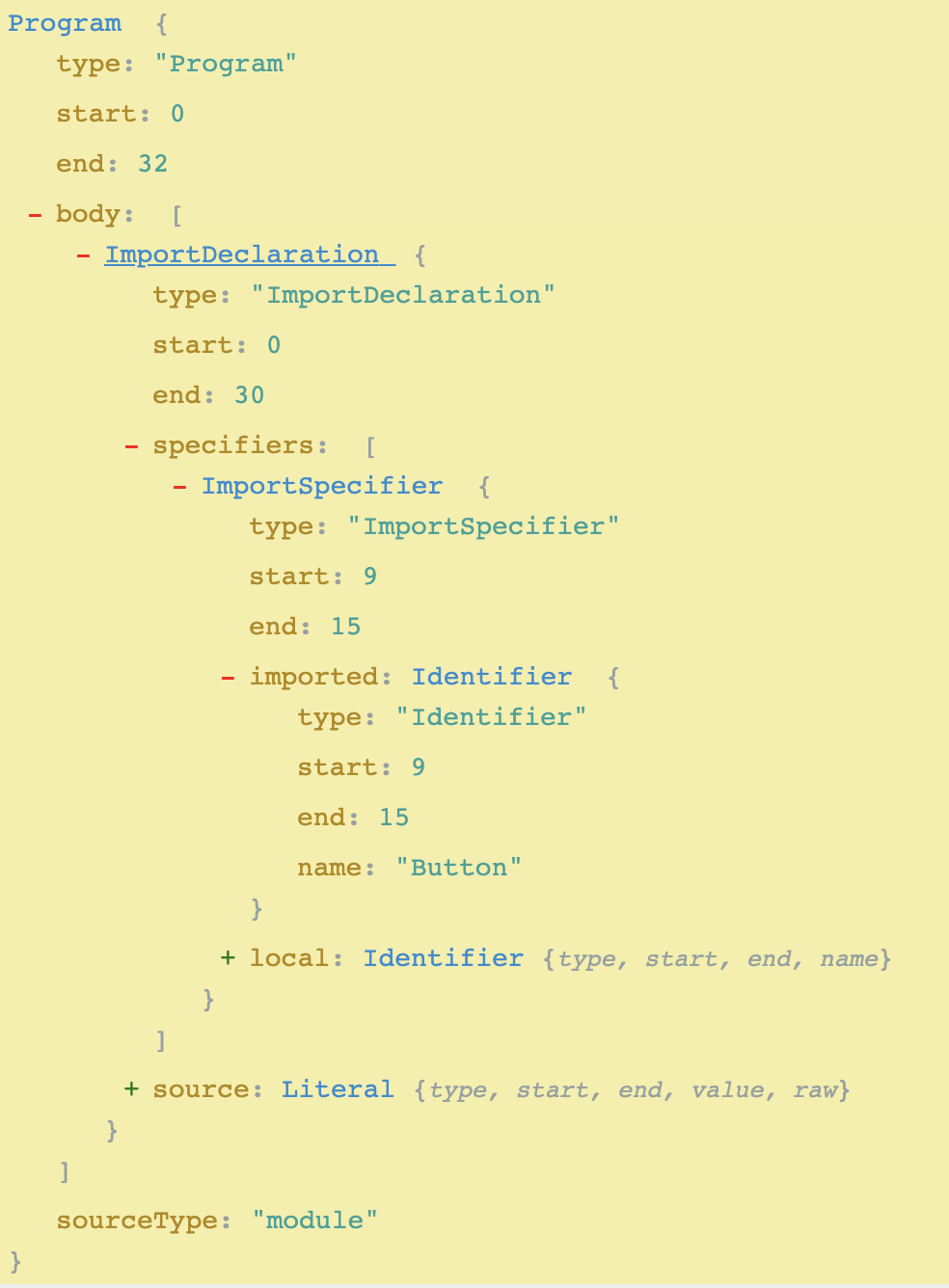
可以从这个 ImportDeclaration 语句中提取几个关键点:
- source.value: antd
- specifier.local.name: Button
- specifier.local.name: Rate
代码
ImportDeclaration(path, state) {
  const { node } = path;
  if (!node) return;
  const { value } = node.source; // 代码里 import 的包名
  const { libraryName } = this; // 插件 options 的包名
  const { types } = this; // babel-type 工具函数
  const pluginState = this.getPluginState(state); // 获取状态
  if (value === libraryName) {
    node.specifiers.forEach(spec => {
      if (types.isImportSpecifier(spec)) { // 判断是不是 ImportSpecifier 类型的节点,也就是是否是大括号的
        // 收集依赖
        pluginState.specified[spec.local.name] = spec.imported.name;
      } else {
        pluginState.libraryObjs[spec.local.name] = true;
      }
    });
    pluginState.pathsToRemove.push(path);
  }
}在 babel 遍历了所有的 ImportDeclaration 节点之后,就收集好了依赖关系,下一步就是如何收集。
第二步 判断是否使用
收集了依赖关系之后,得要判断一下这些 import 的变量是否被使用到了:
首先会进行如下的转换
ReactDOM.render(<Button>Hello</Button>);转换到
React.createElement(Button, null, "Hello");判断其是否进行了转换
第三步 生成引入代码(核心)
第一步和第二步主要的工作是找到需要被插件处理的依赖关系:
import { Button, Rate } from 'antd';
ReactDOM.render(<Button>Hello</Button>);Button 组件使用到了,Rate 在代码里未使用。所以插件要做的也只是自动引入 Button 的代码和样式即可。
import { Button } from 'antd';转换成
var _button = require('antd/lib/button');
require('antd/lib/button/style');babel-plugin-import 和普遍的 babel 插件一样,会遍历代码的 ast,然后在 ast 上做了一些事情:
- 收集依赖:找到
importDeclaration,分析出包x和依赖y,z,例如x和libraryName是一致的,就将其收集起来。 - 判断是否使用:判断收集到的依赖是否被使用,如果有使用就调用
importMethod生成新的import语句。 - 生成引入代码:根据配置项生成代码和样式的
import语句